Multi-layer PCB, HDI PCB, Rigid-flex PCB, PCBA factory



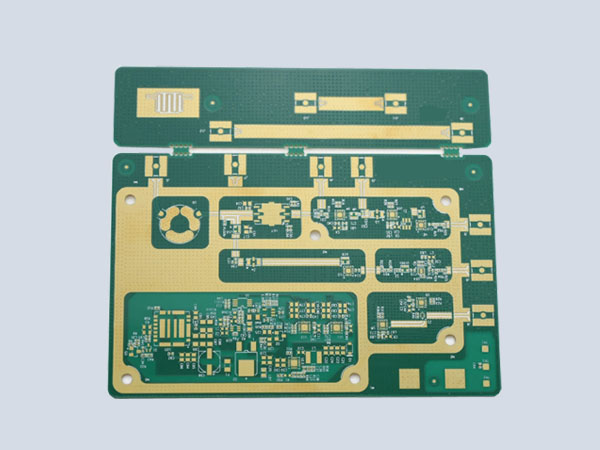
The technical implementation process of circuit board copying is simply to scan the circuit board to be copied, record the detailed location of components, then remove the components to make a bill of materials (BOM) and arrange material procurement. The blank board is scanned into a picture and processed by the copying software to restore it to a PCB board file. The PCB file is then sent to the plate making factory for board making. After the board is made, the purchased components are soldered to the made PCB board, and then the circuit board is tested and debugged.
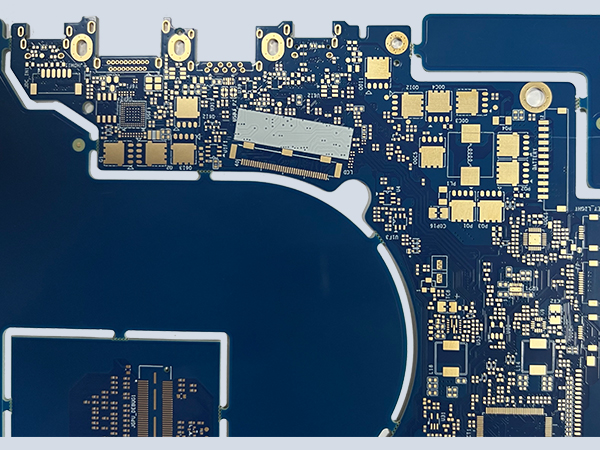
1. Get a PCB. First, write down the model, specifications, and positions of all components on paper, especially the orientation of diodes and transistors, and the direction of the IC notch. It's best to take two photos of the component positions with a digital camera. With today's increasingly advanced PCBs, some diodes and transistors can be completely invisible without careful attention.
2. Remove all multilayer components and remove the tin from the pad holes. Clean the PCB with alcohol and place it in a scanner. When scanning, slightly increase the resolution to obtain a clearer image. Lightly polish the top and bottom layers with gauze paper until the copper coating is shiny. Place the PCB in the scanner, launch Photoshop, and scan both layers in color. Make sure the PCB is level and upright in the scanner, otherwise the scanned image will be unusable.
3. Adjust the canvas's contrast and brightness to create a strong contrast between the copper-coated and non-coated areas. Then convert the image to black and white and check for clarity. If not, repeat this step. If so, save the image as black and white BMP files, TOP.BMP and BOT.BMP. If any issues are found, you can use Photoshop to repair and correct them.
4. Convert both BMP files to PROTEL. Load two layers into PROTEL. If the pads and vias on both layers are roughly aligned, the previous steps have been successful. If there are any discrepancies, repeat step 3. PCB copying is a very patient process, as even the smallest errors can affect the quality and accuracy of the final copy.
5. Convert the BMP file from the TOP layer to TOP.PCB. Remember to convert it to the SILK layer (the yellow layer). Then trace the lines on this layer and place the components according to the drawing in step 2. Delete the SILK layer after drawing. Repeat this process until all layers are drawn.
6. Import TOP.PCB and BOT.PCB into PROTEL and combine them into a single drawing.
7. Use a laser printer to print the top and bottom layers onto transparent film (1:1 ratio). Place the film on the PCB and compare them to see if there are any errors. If they are, you're done.
You've created a copy board that's identical to the original, but that's only half the job. You still need to test the copy board to see if its electronic performance matches the original. If it does, it's truly finished.
Note: If it's a multi-layer board, carefully polish the inner layers and repeat steps 3 through 5. Of course, the graphic naming will vary depending on the number of layers. Generally, copying a double-sided board is much simpler than a multi-layer board. Multi-layer boards are more prone to misalignment, so copying a multi-layer board requires extra care and attention (internal vias and non-vias are particularly prone to problems).
1. Scan the top and bottom surfaces of the PCB and save two BMP images.
2. Open the PCB copying software Quickpcb2005 and click "File" > "Open Base Image" to open a scanned image. Use PageUp to zoom in on the screen. When you see a pad, press PP to place it. When you see a trace, press PT to route it... Just like a child tracing, trace it in the software and click "Save" to create a B2P file.
3. Then click "File" > "Open Base Image" to open the scanned color image on another layer.
4. Then click "File" > "Open" to open the previously saved B2P file. We'll see the copied board superimposed on the image—it's the same PCB, with the same holes in the same locations, but different trace connections. So, go to "Options" > "Layer Settings" and disable the display of the top-layer traces and silkscreen, leaving only the vias on the multiple layers.
5. The vias on the top layer are now in the same locations as those on the bottom layer image. Now, trace the bottom layer traces, just like we did when we were children. Click "Save" again—the B2P file now contains data for both the top and bottom layers.
6. Click "File" "Export as PCB File" to get a PCB file with two layers of data. You can modify the board or generate a schematic diagram or send it directly to the PCB plate making factory for production.
A four-layer board copy is essentially just copying two double-sided boards, and a six-layer board is just copying three double-sided boards. Multi-layer boards are daunting because we can't see the internal traces. How can we see the inner workings of a precise multi-layer board? — Delamination.
There are many methods for delamination now, including chemical etching and tool stripping, but it's easy to over-strip the layers and lose data. Experience has shown that sandpapering is the most accurate method.
After copying the top and bottom layers of a PCB, we typically use sandpaper to remove the surface layers to reveal the inner layers. Sandpaper is the standard sandpaper sold at hardware stores. Lay the PCB flat, press it down, and rub it evenly across the board. (For smaller boards, you can also lay the sandpaper flat and press one finger against the PCB while rubbing it.) The key is to lay it flat to ensure even grinding.
Silkscreen and green varnish often come off easily, so copper traces and copper foil require several thorough rubbings. Generally speaking, a Bluetooth board can be wiped in a few minutes, while a memory stick takes about ten minutes. Of course, more effort will take less time, while less effort will take longer.
Scratching the board is currently the most common and economical method for layering. You can try this on a discarded PCB. Scraping isn't technically difficult, though it's a bit tedious and requires some effort. Don't worry about grinding through the board or even cutting your fingers.
During the PCB layout process, after the system layout is completed, the PCB diagram should be reviewed to determine if the layout is reasonable and optimal. This can typically be done from the following perspectives:
1. Whether the system layout ensures reasonable or optimal routing, reliable routing, and reliable circuit operation. During layout, a comprehensive understanding and planning of signal routing, power, and ground networks are essential.
2. Whether the printed circuit board dimensions match the fabrication drawing dimensions, meet PCB manufacturing process requirements, and include any behavioral markings. This requires special attention. Many PCBs feature beautifully designed and well-designed circuit layouts and routing, but the precise positioning of connectors is neglected, resulting in the design's circuits not being able to interface with other circuits.
3. Check for component conflicts in two- and three-dimensional space. Pay attention to the actual dimensions of the components, especially their height. For components that require soldering without layout, the height should generally not exceed 3mm.
4. Check the density and arrangement of components, ensuring they are properly arranged and fully laid out. When laying out components, consider not only the signal routing and type, as well as areas requiring attention or protection, but also the overall density of the components, ensuring uniformity.
5. Check whether frequently replaced components can be easily replaced, and whether the plug-in board can be easily inserted into the device. Frequently replaced components should be easily replaced and reliably connected.
 QR code WeChat
 Whatsapp